Designing Juno: An AI-Powered Exam Readiness Platform for Students Transitioning to Higher Education

Product Design, Branding, Research, Testing,
Tools
Figma, Illustrator, Chat GPT, Google Analytics
DATE
April 9, 2025

Project Overview

Juno AI is a mobile learning platform designed to help students prepare for two key standardized exams (JAMB and SSCE) required to gain admission into higher institutions. The app combines structured practice, intelligent feedback, and real exam simulation to build confidence and competence in test-takers. The app integrates AI tutoring, real exam simulation, and structured practice sessions to help students transition confidently from high school to higher education.

It bridges the gap between traditional study habits and adaptive digital learning with modern AI support, helping learners prepare more effectively and consistently for academic advancement right at the palm of their hands.

The goal was to design a product that not only simplifies preparation but also builds student discipline and readiness through intelligent support and progressive learning.

Design Challenge

Preparing for national entrance exams is often stressful and isolating, especially for students without access to structured guidance or personalized feedback. Traditional prep methods like printed booklets or general online resources lack adaptability to each student’s pace and knowledge gaps.

The key challenge was to design a mobile experience that feels as reliable as a tutor, yet scalable to serve thousands of learners at once. The interface had to stay focused, distraction-free, and academically serious, while allowing AI to handle context-rich interactions without overwhelming users.

In today’s digital age, students face unprecedented levels of distraction from social media, entertainment apps, and constant notifications. Sustaining academic focus on a mobile platform required designing for motivation as much as for usability.

Research Insights

From interviews and early concept testing, several insights shaped the product direction:

  1. Consistency over quantity: Students preferred smaller, focused daily sessions instead of large question banks.
  2. Realism improves confidence: Practicing under simulated exam conditions boosted preparedness.
  3. Explanations matter more than answers: Learners valued contextual AI feedback that explained why an answer was correct.
  4. Minimal UI lowers anxiety: Too many visual elements made users feel distracted or under pressure.

These insights guided the design tone: clear, calm, and academically focused ensuring students could trust the app for sustained study.

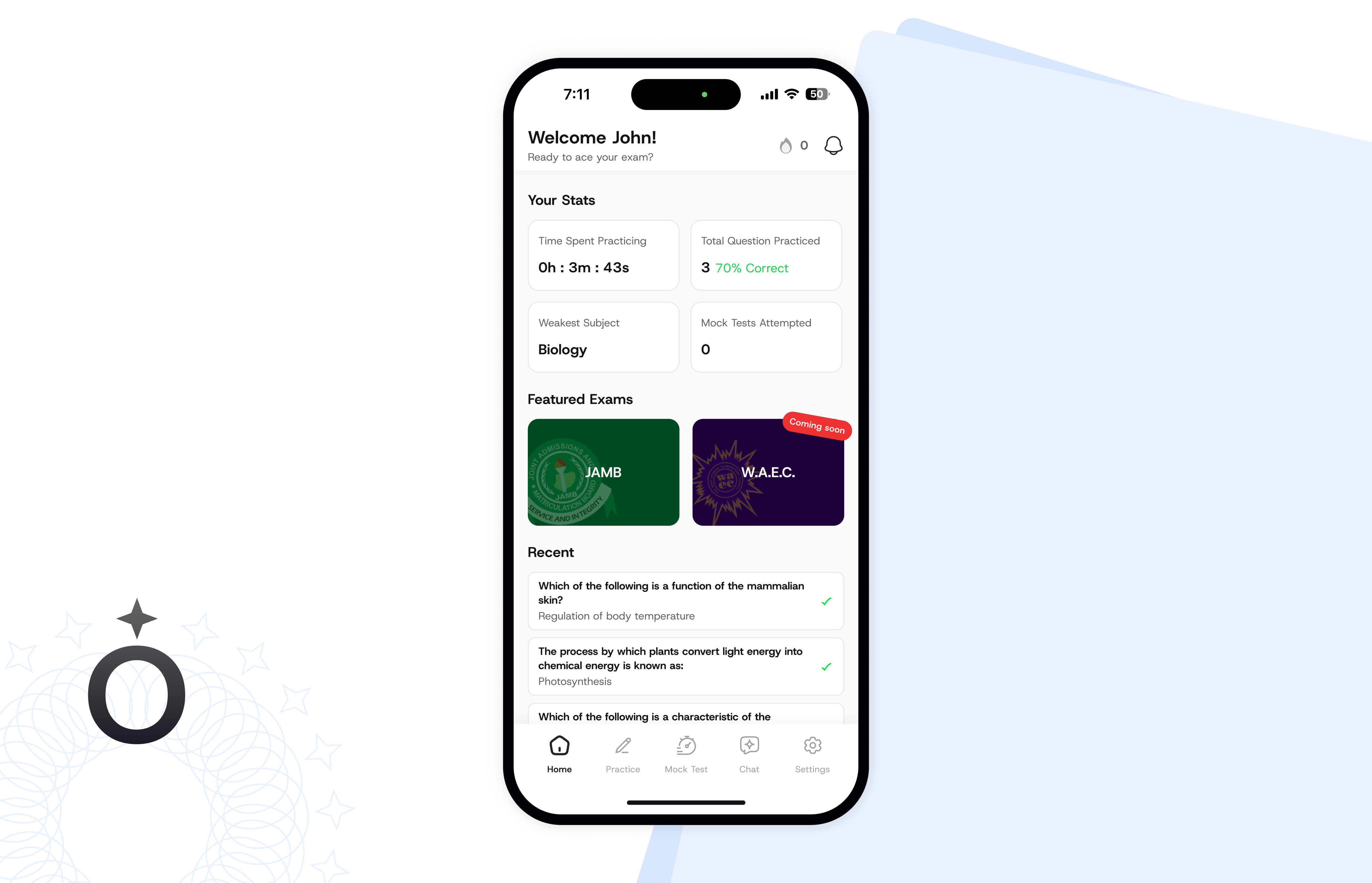
The Landing page of the Redesign

Design Goals

  1. Create an intuitive structure that helps students move seamlessly between practice, review, and exam simulation.
  2. Integrate AI tutoring that feels personal and supportive rather than robotic.
  3. Build an exam environment that mirrors real-life test conditions to strengthen mental readiness.
  4. Provide progress visibility through data visualization; showing mastery levels and weak areas.
  5. Ensure accessibility and low cognitive load, making the platform usable even under time pressure or on smaller screens.
  6. Streak system — a subtle behavioral nudge that rewards consistency and daily engagement. Rather than creating pressure, the streak feature instills a sense of progress and continuity, helping learners stay anchored to their preparation routine despite digital noise.

Key Design Decisions

  • Tab Bar Navigation: Established clear access to the app’s five pillars (Practice, Exam, Chat, etc.) to reduce friction.
  • Streak system: behavioral nudge that instills a sense of progress and continuity, helpinglearners stay anchored to their preparation routine despite digital noise.
  • AI Chat Experience: Designed with a conversational tone and contextual feedback and display for clarity, allowing the tutor to not only provide answers but also recommend micro-lessons for weak areas there by creating a seamless loop between assessment and mastery.
  • Exam Simulator: Focused on typography and timing feedback to mimic the real test interface.
  • Progress Tracking: Used color-coded progress rings and streaks to visually reinforce learning momentum.
  • Accurate Analytics layer: to visualize students’ learning journeys over time, making progress tracking more transparent and rewarding.
  • Minimal Color Palette: Prioritized focus and concentration, avoiding overstimulation.

Outcome & Impact

While Juno is still in its closed testing phase, early feedback from selected user groups has validated several of its core design principles and feature hypotheses. The testing cohort: composed primarily of final-year secondary school students preparing for national entrance exams provided qualitative insights that continue to shape product refinement before public release.

Key Observations from Closed Testing:

  • Improved engagement consistency: The streak system successfully encouraged repeat usage, with most students returning to the app at least five consecutive days per week.
  • AI chat usability validation: Testers reported that the conversational breakdown of questions felt “like having a patient tutor”, confirming that the tone and flow of the AI chat reduced learning anxiety. Although there's a consensus among us (the experts who worked on the product) that the machine's feedback are a bit generic and need to be more advanced.
  • Simulation credibility: The exam environment design was described as “realistic” and “helpful for timing practice,” signaling strong alignment with the target exam format.
  • Ease of navigation: The five-tab structure proved intuitive, with 90% of testers able to move between sections without onboarding prompts after their first use.

The closed testing phase continues to inform refinements around personalized progress tracking, question difficulty calibration, and AI explanation depth. Future updates will focus on expanding the data visualization layer to help students see longitudinal growth and topic mastery before the app’s public launch.

No items found.

Reflection & Learnings

The biggest takeaway was that students don’t just need access, they need guidance and reassurance. Thus, the inclusion of features like AI chat and streak tracking highlighted how digital tools can reduce anxiety and sustain focus, especially in an era of fragmented attention. It was essential to craft an interface that felt encouraging rather than punitive, maintaining a sense of progress even when performance fluctuated.

Looking ahead, We plan to expand the examination categories beyond the JAMB and SSCE to other vital certifications.

Other Projects